cassandra – consistent hashing

Consistent hashing allows distribution of data across a cluster to minimize reorganization when nodes are added or removed. Consistent hashing partitions data based on the partition key. (For an explanation of partition keys and primary keys, see the Data modeling example in CQL for Cassandra 2.0.)

For example, if you have the following data:

name age car gender
jim 36 camaro M
carol 37 bmw F
johnny 12 M
suzy 10 F

Cassandra assigns a hash value to each partition key:

Partition key Murmur3 hash value
jim -2245462676723223822
carol 7723358927203680754
johnny -6723372854036780875
suzy 1168604627387940318

Each node in the cluster is responsible for a range of data based on the hash value:
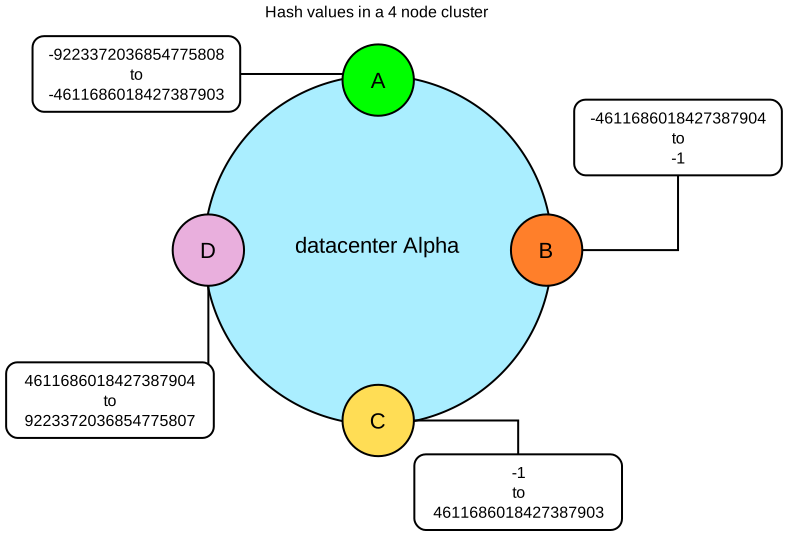
Cassandra places the data on each node according to the value of the partition key and the range that the node is responsible for. For example, in a four node cluster, the data in this example is distributed as follows:

Node Start range End range Partition key Hash value
A -9223372036854775808 -4611686018427387903 johnny -6723372854036780875
B -4611686018427387904 -1 jim -2245462676723223822
C 0 4611686018427387903 suzy 1168604627387940318
D 4611686018427387904 9223372036854775807 carol 7723358927203680754

cassandra – Generating tokens

Generating tokens

If not using virtual nodes (vnodes), you must calculate tokens for your cluster.

About calculating tokens for single or multiple datacenters in Cassandra 1.2 and later 

  • Single datacenter deployments: Calculate tokens by dividing the hash range by the number of nodes in the cluster.
  • Multiple datacenter deployments: Calculate the tokens for each datacenter so that the hash range is evenly divided for the nodes in each datacenter.


Calculating tokens for the Murmur3Partitioner 

Use this method for generating tokens when you are not using virtual nodes (vnodes) and using the Murmur3Partitioner (default). This partitioner uses a maximum possible range of hash values from -263 to +263-1. To calculate tokens for this partitioner:

python -c 'print [str(((2**64 / number_of_tokens) * i) - 2**63) for i in range(number_of_tokens)]'

For example, to generate tokens for 6 nodes:

python -c 'print [str(((2**64 / 6) * i) - 2**63) for i in range(6)]'

The command displays the token for each node:

[ '-9223372036854775808', '-6148914691236517206', '-3074457345618258604', 
  '-2', '3074457345618258600', '6148914691236517202' ]

cassandra – partitioner – Murmur3Partitioner

Partitioners

A partitioner determines how data is distributed across the nodes in the cluster (including replicas). Basically, a partitioner is a function for deriving a token representing a row from its partion key, typically by hashing. Each row of data is then distributed across the cluster by the value of the token.

Both the Murmur3Partitioner and RandomPartitioner use tokens to help assign equal portions of data to each node and evenly distribute data from all the tables throughout the ring or other grouping, such as a keyspace. This is true even if the tables use different partition key, such as usernames or timestamps. Moreover, the read and write requests to the cluster are also evenly distributed and load balancing is simplified because each part of the hash range receives an equal number of rows on average. For more detailed information, see Consistent hashing.

  • Murmur3Partitioner (default): uniformly distributes data across the cluster based on MurmurHash hash values.

Note: If using virtual nodes (vnodes), you do not need to calculate the tokens. If not using vnodes, you must calculate the tokens to assign to the initial_token parameter in the cassandra.yaml file. See Generating tokens and use the method for the type of partitioner you are using.

cassandra – starting seed nodes first and then other nodes


  • In the cassandra-rackdc.properties file, assign the data center and rack names you determined in the Prerequisites. For example:
    # indicate the rack and dc for this node
    dc=DC1
    rack=RAC1
  • After you have installed and configured Cassandra on all nodes, start the seed nodes one at a time, and then start the rest of the nodes.
    Note: If the node has restarted because of automatic restart, you must first stop the node and clear the data directories, as described above.

    Package installations:

    $ sudo service cassandra start

    Tarball installations:

    $ cd install_location 
    $ bin/cassandra
  • To check that the ring is up and running, run:

    Package installations:

    $ nodetool status

    Tarball installations:

    $ cd install_location 
    $ bin/nodetool status

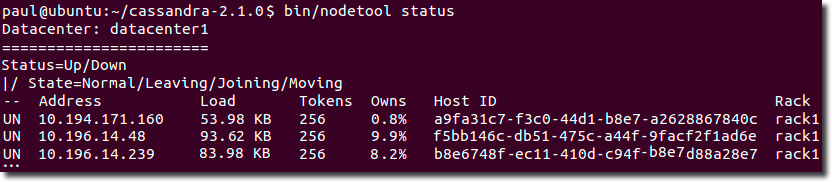
    Each node should be listed and it’s status and state should be UN (Up Normal).


cassandra – GossipingPropertyFileSnitch

GossipingPropertyFileSnitch

This snitch is recommended for production. It uses rack and datacenter information for the local node defined in the cassandra-rackdc.properties file and propagates this information to other nodes via gossip.

The cassandra-rackdc.properties file defines the default datacenter and rack used by this snitch:

Note: datacenter and rack names are case-sensitive.
dc=DC1
rack=RAC1

To save bandwidth, add the prefer_local=true option. This option tells Cassandra to use the local IP address when communication is not across different datacenters.

To allow migration from the PropertyFileSnitch, the GossipingPropertyFileSnitch uses the cassandra-topology.properties file when present.

cassandra – yaml – seed_provider

seed_provider The addresses of hosts deemed contact points. Cassandra nodes use the -seeds list to find each other and learn the topology of the ring.

  • class_name (Default: org.apache.cassandra.locator.SimpleSeedProvider)

    The class within Cassandra that handles the seed logic. It can be customized, but this is typically not required.

  • – seeds (Default: 127.0.0.1)

    A comma-delimited list of IP addresses used by gossip for bootstrapping new nodes joining a cluster.

  • When running multiple nodes, you must change the list from the default value.

  • In multiple data-center clusters, the seed list should include at least one node from each datacenter (replication group).

  • More than a single seed node per datacenter is recommended for fault tolerance. Otherwise, gossip has to communicate with another datacenter when bootstrapping a node.

  • Making every node a seed node is not recommended because of increased maintenance and reduced gossip performance.

  • Gossip optimization is not critical, but it is recommended to use a small seed list (approximately three nodes per datacenter).


cassandra – yaml – commonly used properties

commit_failure_policy 
(Default: stop) Policy for commit disk failures:

  • die

    Shut down gossip and Thrift and kill the JVM, so the node can be replaced.

  • stop

    Shut down gossip and Thrift, leaving the node effectively dead, but can be inspected using JMX.

  • stop_commit

    Shut down the commit log, letting writes collect but continuing to service reads (as in pre-2.0.5 Cassandra).

  • ignore

    Ignore fatal errors and let the batches fail.

disk_failure_policy (Default: stop) Sets how Cassandra responds to disk failure. Recommend settings are stop or best_effort.

  • die

    Shut down gossip and Thrift and kill the JVM for any file system errors or single SSTable errors, so the node can be replaced.

  • stop_paranoid

    Shut down gossip and Thrift even for single SSTable errors.

  • stop

    Shut down gossip and Thrift, leaving the node effectively dead, but available for inspection using JMX.

  • best_effort

    Stop using the failed disk and respond to requests based on the remaining available SSTables. This means you will see obsolete data at consistency level of ONE.

  • ignore

    Ignores fatal errors and lets the requests fail; all file system errors are logged but otherwise ignored. Cassandra acts as in versions prior to 1.2.


endpoint_snitch 

(Default: org.apache.cassandra.locator.SimpleSnitch) Set to a class that implements the IEndpointSnitch. Cassandra uses snitches for locating nodes and routing requests.

  • GossipingPropertyFileSnitch

    Recommended for production. The rack and datacenter for the local node are defined in the cassandra-rackdc.properties file and propagated to other nodes via gossip. To allow migration from the PropertyFileSnitch, it uses the cassandra-topology.properties file if it is present.

  • PropertyFileSnitch

    Determines proximity by rack and datacenter, which are explicitly configured in the cassandra-topology.properties file.

  • Ec2Snitch

    For EC2 deployments in a single region. Loads region and availability zone information from the EC2 API. The region is treated as the datacenter and the availability zone as the rack. Uses only private IPs. Subsequently it does not work across multiple regions.


Snitches

A snitch determines which datacenters and racks nodes belong to. They inform Cassandra about the network topology so that requests are routed efficiently and allows Cassandra to distribute replicas by grouping machines into datacenters and racks. Specifically, the replication strategy places the replicas based on the information provided by the new snitch. All nodes must return to the same rack and datacenter. Cassandra does its best not to have more than one replica on the same rack (which is not necessarily a physical location).

Note: If you change snitches, you may need to perform additional steps because the snitch affects where replicas are placed. See Switching snitches.


rpc_address 
(Default: localhost) The listen address for client connections (Thrift RPC service and native transport).Valid values are:

  • unset:

    Resolves the address using the hostname configuration of the node. If left unset, the hostname must resolve to the IP address of this node using /etc/hostname, /etc/hosts, or DNS.

  • 0.0.0.0:

    Listens on all configured interfaces, but you must set the broadcast_rpc_address to a value other than 0.0.0.0.

  • IP address
  • hostname

Related information: Network

rpc_interface 
(Default: eth1)note The listen address for client connections. Interfaces must correspond to a single address, IP aliasing is not supported. See rpc_address.
rpc_interface 
(Default: false) By default, if an interface has an ipv4 and an ipv6 address, the first ipv4 address will be used. If set to true, the first ipv6 address will be used.


cassandra – yaml – saved caches dir

data_file_directories 
The directory location where table data (SSTables) is stored. Cassandra distributes data evenly across the location, subject to the granularity of the configured compaction strategy. Default locations:

  • Package installations: /var/lib/cassandra/data
  • Tarball installations: install_location/data/data

As a production best practice, use RAID 0 and SSDs.

saved_caches_directory 
The directory location where table key and row caches are stored. Default location:

  • Package installations: /var/lib/cassandra/saved_caches
  • Tarball installations: install_location/data/saved_caches

cassandra – commit log dir

Default directories

If you have changed any of the default directories during installation, make sure you have root access and set these properties:

commitlog_directory 
The directory where the commit log is stored. Default locations:

  • Package installations: /var/lib/cassandra/commitlog
  • Tarball installations: install_location/data/commitlog

For optimal write performance, place the commit log be on a separate disk partition, or (ideally) a separate physical device from the data file directories. Because the commit log is append only, an HDD for is acceptable for this purpose.

cassandra – yaml – common properties – endpoint snitch


endpoint_snitch 

(Default: org.apache.cassandra.locator.SimpleSnitch) Set to a class that implements the IEndpointSnitch. Cassandra uses snitches for locating nodes and routing requests.

  • GossipingPropertyFileSnitch

    Recommended for production. The rack and datacenter for the local node are defined in the cassandra-rackdc.properties file and propagated to other nodes via gossip. To allow migration from the PropertyFileSnitch, it uses the cassandra-topology.properties file if it is present.

  • PropertyFileSnitch

    Determines proximity by rack and datacenter, which are explicitly configured in the cassandra-topology.properties file.