- To check that the ring is up and running, run:
Package installations:
$ nodetool statusTarball installations:
$ cd install_location
$ bin/nodetool status
Each node should be listed and it’s status and state should be UN (Up Normal).
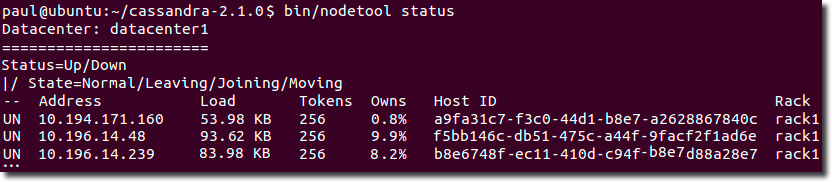
Package installations:
$ nodetool status
Tarball installations:
$ cd install_location
$ bin/nodetool status
Each node should be listed and it’s status and state should be UN (Up Normal).
Shut down gossip and Thrift and kill the JVM, so the node can be replaced.
Shut down gossip and Thrift, leaving the node effectively dead, but can be inspected using JMX.
Shut down the commit log, letting writes collect but continuing to service reads (as in pre-2.0.5 Cassandra).
Ignore fatal errors and let the batches fail.
disk_failure_policy (Default: stop) Sets how Cassandra responds to disk failure. Recommend settings are stop or best_effort.
Shut down gossip and Thrift and kill the JVM for any file system errors or single SSTable errors, so the node can be replaced.
Shut down gossip and Thrift even for single SSTable errors.
Shut down gossip and Thrift, leaving the node effectively dead, but available for inspection using JMX.
Stop using the failed disk and respond to requests based on the remaining available SSTables. This means you will see obsolete data at consistency level of ONE.
Ignores fatal errors and lets the requests fail; all file system errors are logged but otherwise ignored. Cassandra acts as in versions prior to 1.2.
(Default: org.apache.cassandra.locator.SimpleSnitch) Set to a class that implements the IEndpointSnitch. Cassandra uses snitches for locating nodes and routing requests.
Recommended for production. The rack and datacenter for the local node are defined in the cassandra-rackdc.properties file and propagated to other nodes via gossip. To allow migration from the PropertyFileSnitch, it uses the cassandra-topology.properties file if it is present.
Determines proximity by rack and datacenter, which are explicitly configured in the cassandra-topology.properties file.
For EC2 deployments in a single region. Loads region and availability zone information from the EC2 API. The region is treated as the datacenter and the availability zone as the rack. Uses only private IPs. Subsequently it does not work across multiple regions.
A snitch determines which datacenters and racks nodes belong to. They inform Cassandra about the network topology so that requests are routed efficiently and allows Cassandra to distribute replicas by grouping machines into datacenters and racks. Specifically, the replication strategy places the replicas based on the information provided by the new snitch. All nodes must return to the same rack and datacenter. Cassandra does its best not to have more than one replica on the same rack (which is not necessarily a physical location).
Resolves the address using the hostname configuration of the node. If left unset, the hostname must resolve to the IP address of this node using /etc/hostname, /etc/hosts, or DNS.
Listens on all configured interfaces, but you must set the broadcast_rpc_address to a value other than 0.0.0.0.
Related information: Network
As a production best practice, use RAID 0 and SSDs.
Default directories
If you have changed any of the default directories during installation, make sure you have root access and set these properties:
For optimal write performance, place the commit log be on a separate disk partition, or (ideally) a separate physical device from the data file directories. Because the commit log is append only, an HDD for is acceptable for this purpose.
(Default: org.apache.cassandra.locator.SimpleSnitch) Set to a class that implements the IEndpointSnitch. Cassandra uses snitches for locating nodes and routing requests.
Recommended for production. The rack and datacenter for the local node are defined in the cassandra-rackdc.properties file and propagated to other nodes via gossip. To allow migration from the PropertyFileSnitch, it uses the cassandra-topology.properties file if it is present.
Determines proximity by rack and datacenter, which are explicitly configured in the cassandra-topology.properties file.
The minimal properties needed for configuring a cluster.
Properties most frequently used when configuring Cassandra.
Tuning performance and system resource utilization, including commit log, compaction, memory, disk I/O, CPU, reads, and writes.
Properties for advanced users or properties that are less commonly used.
Server and client security settings.
The cassandra.yaml file is the main configuration file for Cassandra.
 Start-Up Ideas, Tech Code, Use Cases, Thoughts